
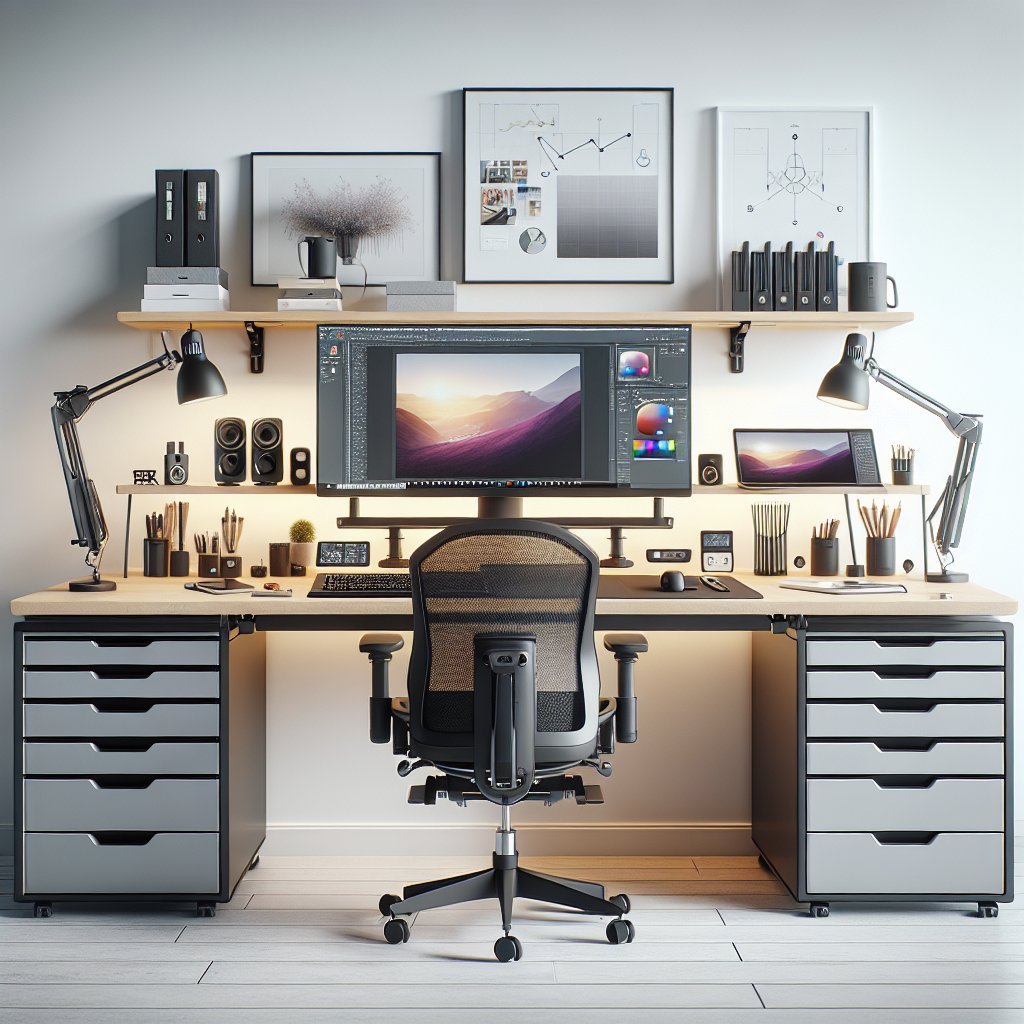
Ergonomic Workspace Layout for Graphic Designers Optimize desk position to face the room’s natural light, avoiding direct glare on screens. Place primary monitor directly in front at arm’s length with the top of the display at or slightly below eye level. Use a dedicated secondary monitor to the side for palettes and references, aligning its height to minimize frequent neck rotation. Position the desk to allow freedom of movement, ensuring adequate surface space for sketching, tablets, and physical materials. Maintain a clear sightline between tools and reference materials to reduce repetitive reaching.
Chair and Posture Invest in a high quality adjustable ergonomic chair with lumbar support, seat depth adjustment, and tilt control. Sit with hips slightly higher than knees, feet flat on the floor or supported by a footrest. Keep knees at approximately a 90 degree angle. Relax shoulders, and maintain a neutral spine. When drawing or using a tablet, pivot from the hips, not the wrists, to change reach and posture.
Desk Height and Monitor Placement Choose a desk at a height that allows forearms to rest parallel to the floor while typing. Consider a sit stand desk to alternate posture every 30 to 60 minutes. Position monitors to minimize upward gaze; looking down 10 to 20 degrees reduces neck strain. Use monitor arms or risers for flexible alignment. Calibrate display brightness, contrast, and color temperature for extended viewing comfort while preserving color accuracy.
Keyboard and Mouse Setup Position keyboard and input devices so wrists remain straight and relaxed. Keep the mouse close to the keyboard to avoid reaching. Consider an ergonomic split keyboard, compact layouts, or a dedicated keypad for repetitive shortcuts. For stylus users, choose a lightweight pen with balanced grip and a textured nib. Alternate input methods such as touch gestures, keyboard macros, and voice commands to distribute strain.
Lighting and Color Environment Use layered lighting: ambient, task, and accent lights. Place adjustable task lamps to illuminate sketches and color proofs without casting monitor glare. Choose neutral color temperatures between 4000K and 5000K for color critical work, and add warmer tones for relaxed review sessions. Control reflective surfaces and calibrate monitors regularly for consistent color reproduction.
Cable Management and Storage Implement cable trays, clips, and underdesk channels to keep wiring organized and prevent trips or desk clutter. Use modular storage such as drawers, shallow shelves, and vertical organizers for papers, pens, and sample swatches. Store frequently used items within arm’s reach, and reserve deeper storage for archives and equipment backups.
Breaks Microergonomics and Movement Adopt the 20 20 20 rule for eye comfort: every 20 minutes, look at something 20 feet away for 20 seconds. Schedule short movement breaks to stretch, walk, or perform shoulder and wrist mobility exercises. Use a sit stand timer or app to automate posture shifts. Integrate mini rituals like a brief warm up before intensive retouching sessions to prime fine motor control.
Accessories and Personalization Choose accessories that support workflow: document holders, display calibration tools, a quality desk mat, and anti fatigue mats for standing. Personalize ergonomics with adjustable armrests, wrist supports, and thumb rests. Maintain an uncluttered aesthetic that reduces decision fatigue while keeping inspirational items within view.
Maintenance and Health Practices Schedule regular equipment checks: tighten screws, clean surfaces, replace worn chair casters, and verify monitor calibration. Prioritize sleep, hydration, and balanced nutrition to support cognitive focus and fine motor performance. If pain or numbness arises, consult an occupational therapist or ergonomist early for assessment and customized interventions.
Ergonomic Checklist for Graphic Design Desks – Seat adjusted for lumbar support and foot positioning. – Monitor at eye level and primary directly ahead. – Keyboard and mouse positioned for neutral wrists. – Task lighting with no glare. – Sit stand options and movement reminders. – Organized cables and reachable storage. – Regular equipment maintenance and health monitoring.
Implementation Tips and ROI Considerations Start with a workspace audit: track time spent seated, posture pain points, and frequency of reaching. Prioritize interventions that reduce the highest exposure to awkward postures. Investing in adjustable furniture and input devices typically reduces fatigue, boosts productivity, and lowers long term injury risk, yielding measurable gains in billable output and staff retention.
Research Backing and Best Practices Ergonomic research links neutral posture, frequent movement, and optimized tool placement with reduced musculoskeletal complaints and improved task performance. Industry studies emphasize individualized adjustments, role specific workflows, and early interventions for creative professionals whose work demands sustained precision. Combining ergonomic design with training on posture habits produces the strongest outcomes.
Final Practical Tips for Daily Use Keep a dedicated cleaning cloth, compressed air, and screen wipes handy to maintain visual clarity. Label charging cables, backups, and peripheral settings to speed setup after changes. Practice two minute micro stretches each hour, and rotate detailed color work with broader composition tasks to vary gaze and motor demands.
Invest in Training and Culture Educate team members on ergonomic principles during onboarding, and host periodic refreshers. Encourage reporting of discomfort without stigma, and respond with workspace modifications. Foster an environment where designers can experiment with setups and document what works best for specific tasks. Track ergonomic investments against reduced sick days, improved throughput, and employee satisfaction metrics.
Smart Technology Integration Use ergonomic apps and wearables to monitor posture, remind breaks, and log activity. Employ color management hardware and software for consistent proofing. Invest in wireless peripherals to reduce cable drag, and choose devices with programmable buttons to speed repetitive workflows. Explore height adjustable tables with memory presets to quickly toggle between seated and standing configurations.
Metrics and Continuous Improvement Collect baseline metrics: time in seated vs standing, frequency of breaks, pain reports, and task completion times. Reassess quarterly and iterate on equipment and layout based on feedback. Small adjustments deliver cumulative ergonomic benefits, and soliciting designer input ensures solutions align with creative workflows. Prioritize fixes that address highest risk behaviors first to maximize return on investment.
Routine personalization of setups, proactive maintenance, and ergonomic culture adoption help studios sustain healthier, more productive creative teams; evaluate tools, iterate, and prioritize wellbeing consistently.